

HTML ELEMENTS
The HTML elements are everything from the start tag to the end tag:
<tagname>Content goes here…</tagname>
Empty Elements: Elements without having content is called ’empty elements’.
E.g: <br> and <hr> element. The <br> element we use to start content from new-line, whereas <hr> element is used to create a line anywhere on our web-page.
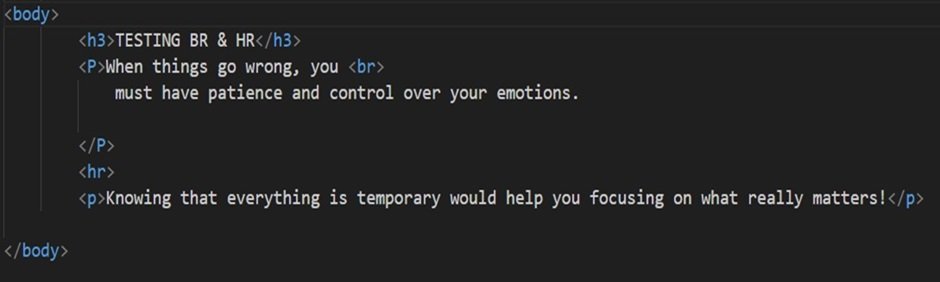
Above is the example showing us utilizing <br> and <hr> element in our text-editor.
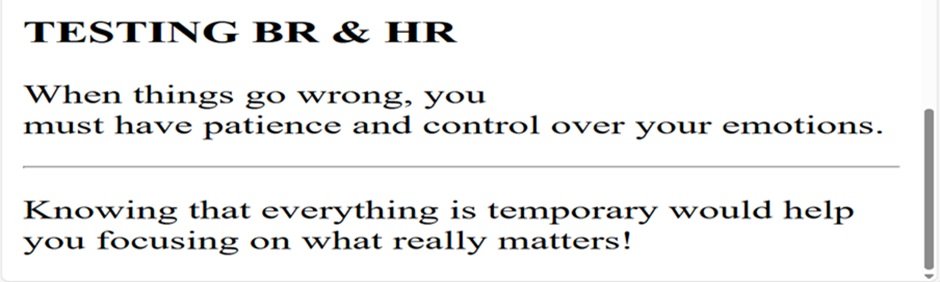
Here is the outcome of applying <br> and <hr> element. We can see it’s affect on our web-page.
Following is the list of HTML Elements mostly in-use:
Basic Structure:
<!DOCTYPE html>: Declares the document type and HTML version.
<html>: The root element of an HTML page, all the other elements nested within this element.
<head>: Contains metadata about the HTML page plus <title> element that defines the title of the HTML page.
<body>: Contains the visible page content.
Content Elements:
<h1> to <h6>: Defines HTML headings, with <h1> being the highest level and <h6> the lowest. <p>: This element defines a paragraph. <a>: Defines a hyperlink (clickable-link) e.g., Visit My Website. <img>: It defines an image.
<ul>: Defines an unordered list (bullet points).
<ol>: Defines an ordered list (numbered).
<li>: Defines a list item, nested within <ul> and <ol> elements.
<div>: Defines a division or section in an HTML document.
<span>: We can use it to make changes such as color, size, style etc. anywhere within the main element.
E.g., <p>My mother has <span style=”color:blue”>blue</span> eyes and my father has <span style=”color:darkolivegreen”>dark green</span> eyes.</p>
OUTCOME = My mother has blue eyes and my father has dark green eyes.
<table>: Defines a table.
<th>: Defines a table header.
<tr>: Defines a table row.
<td>: Defines a table data. <form>: Defines an HTML form for user input.
<input>: Defines an input control. e.g., <input type=”text”>
<button>: Defines a clickable button.
Semantic Elements:
<header>: Defines a header for a web-page.
<nav>: Defines navigation links.
<main>: Defines the main content of a document.
<article>: Defines independent, self-contained content.
<footer>: Defines a footer for a web-page.
<section>: Defines a section in a document.
Other Elements:
<address>: Defines contact information.
<code>: This tag we use to write computer code.
<em>: Defines emphasized text, in other words italic text. <strong>: Defines bold text.
<u>: Defines underlined text.
<audio>: This tag defines embedded sound content.
Note: Many html-elements works in conjunction with html-attributes. In our next blog, we’ll learn exactly about it.
Till then;
Keep Learning.. have fun!